Case Study

Spryly

One window for a maker’s whole bench. Plan the work, hand it to coding agents, and read every line before it merges.

Spryly is LateralTranslucence’s own product, and the studio did all of it: the product thinking, the interface, the wordmark and icon, the native apps, the web service behind them, and the pipeline that ships them.

It started as a web dashboard that tells developers which dependencies they can safely upgrade. It grew into a native Mac app for the whole job around the code: planning the work, handing it to Claude Code or Codex, and reading what comes back before any of it merges.

Spryly app icon
Studio role
Product strategy
UX & interface design
Brand, wordmark, and icon
Engineering & release
Platforms
macOS 14 and later
iPhone
Web at spryly.io
Built with
  • Swift
  • SwiftUI
  • AppKit
  • SwiftTerm
  • Sparkle
  • Next.js
  • React
  • TypeScript
  • Supabase
  • Stripe
  • Upstash
  • SASS
Year
2026

The Build

Five decisions that shaped Spryly, and how each one was built.

One window for a maker’s whole bench

A solo maker doesn’t have one project. They have a dozen: client work, a product, a side project that isn’t software at all. Spryly puts them all on one board, a list, and a week planner, with time tracking and a clock in the menu bar.

Every card does the triage. It shows the project’s next action, its nearest due date as a dot, and the hours logged. It fades once nothing has moved in three weeks. Three sections share the window (Planning, Code, and Stack) and each links to the others: open a project’s code from its card, or the task behind a branch from the code.

Back a project with a GitHub or GitLab repository and its issues arrive as tasks, with its open pull requests on the card. Everything syncs through Supabase, so every Mac and the iPhone see the same bench.
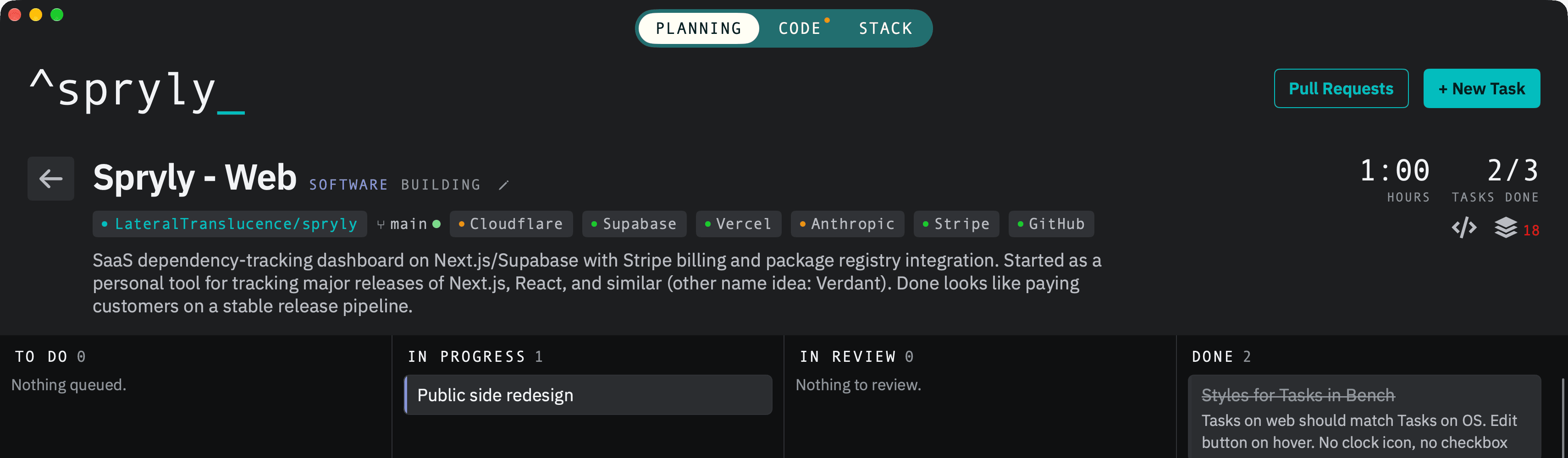
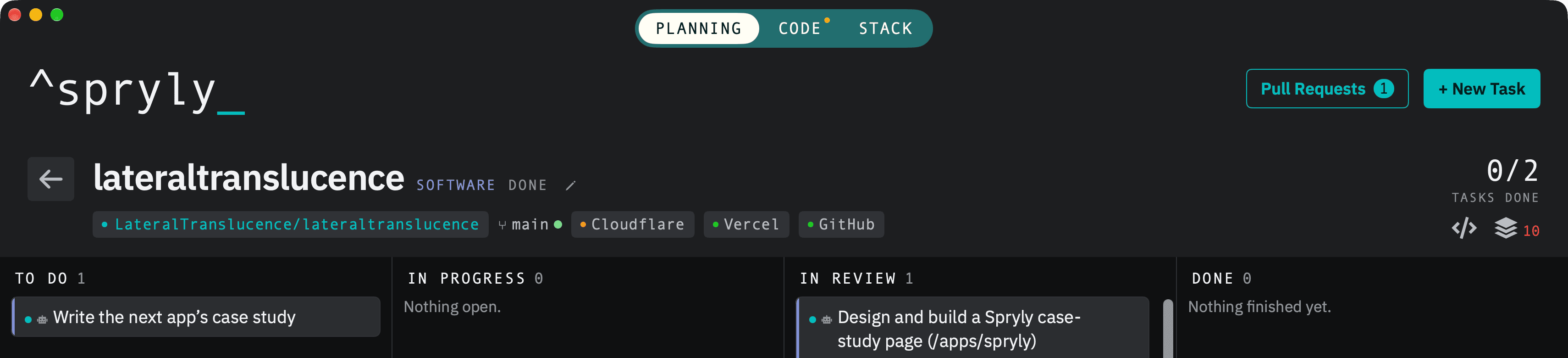
Spryly's Planning section on the Spryly - Web project: its repository and the services it runs on, hours logged, tasks done, and its task board in To Do, In Progress, In Review, and Done

It won’t merge what you haven’t read

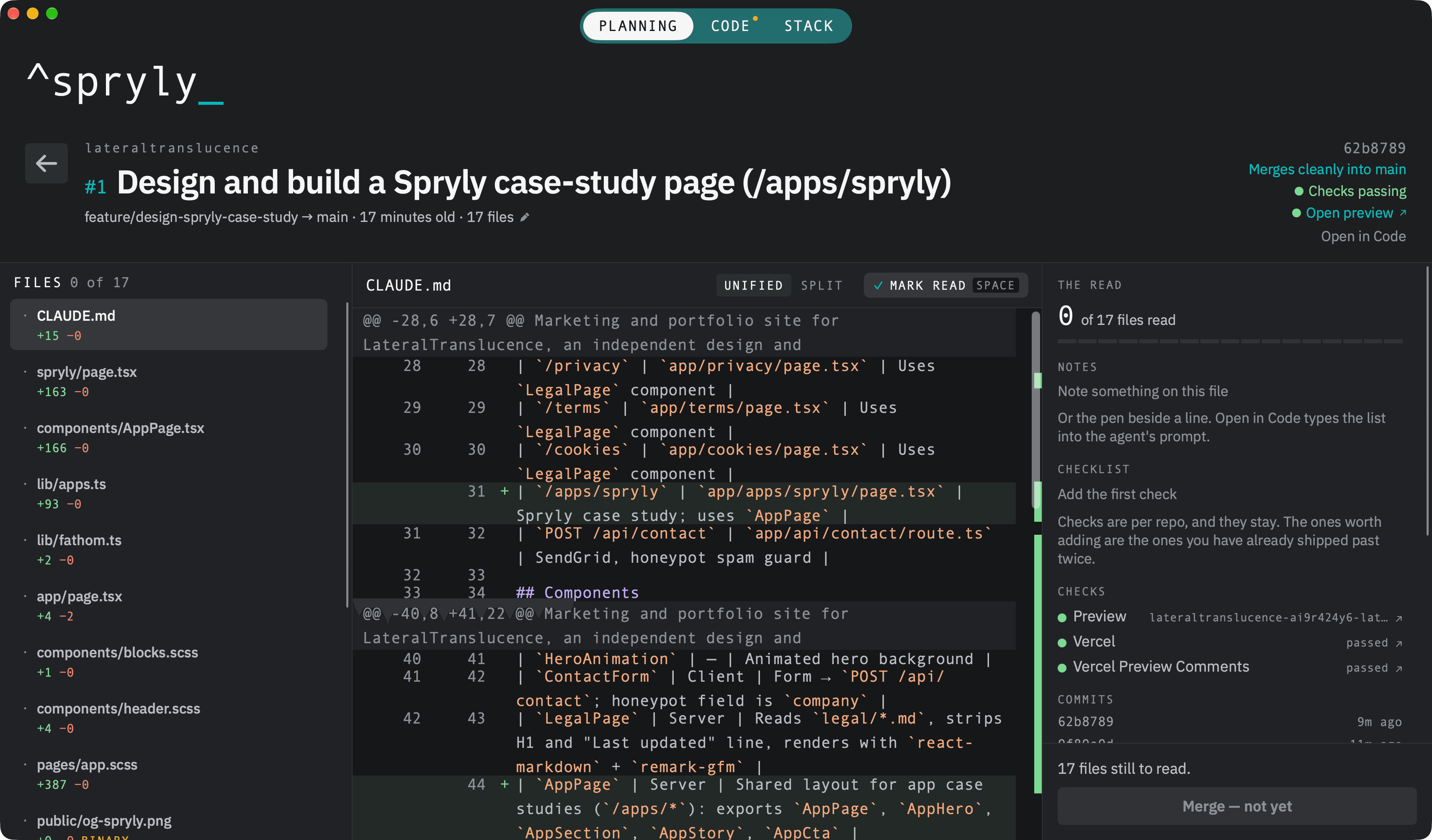
Agents write code faster than anyone can review it, so review is where Spryly takes a stand. Its diff reader, the gate, has you mark every file read before it lets you merge. It won’t merge over a failing check, a draft stays a draft until it’s marked ready, and the author’s description only appears once you’ve read the code. You judge the change before you read the pitch.

The read travels with the merge. Spryly ends the merge commit with trailers (Read-By, Read-At, Read-Files), so git log records who read the change and at which commit. Reads are keyed to the head commit: a force-push sends the change back to the queue, and a second round shows only what’s new or different.

The gate on this case study's own pull request: 0 of 17 files read, the diff of CLAUDE.md, passing checks, and Merge held as “not yet” with 17 files still to read

Hand a task to an agent the way you’d hand it to a developer

Hand to Agent gives the task a branch and its own worktree, moves it to In Progress, and starts Claude Code or Codex there with the task’s note and attached files as its first message. The agent commits as it goes. After each turn Spryly pushes, and after the first push it opens a draft pull request, so checks run on every push.

When the work is done, the agent calls Spryly’s hand_in tool with a summary. Spryly refuses while anything is uncommitted, then marks the pull request ready, moves the task to In Review, and sends a notification that opens the gate. Notes left in the gate go straight back into the agent’s prompt. It’s the loop a team runs around a pull request, built for one person and their agents.

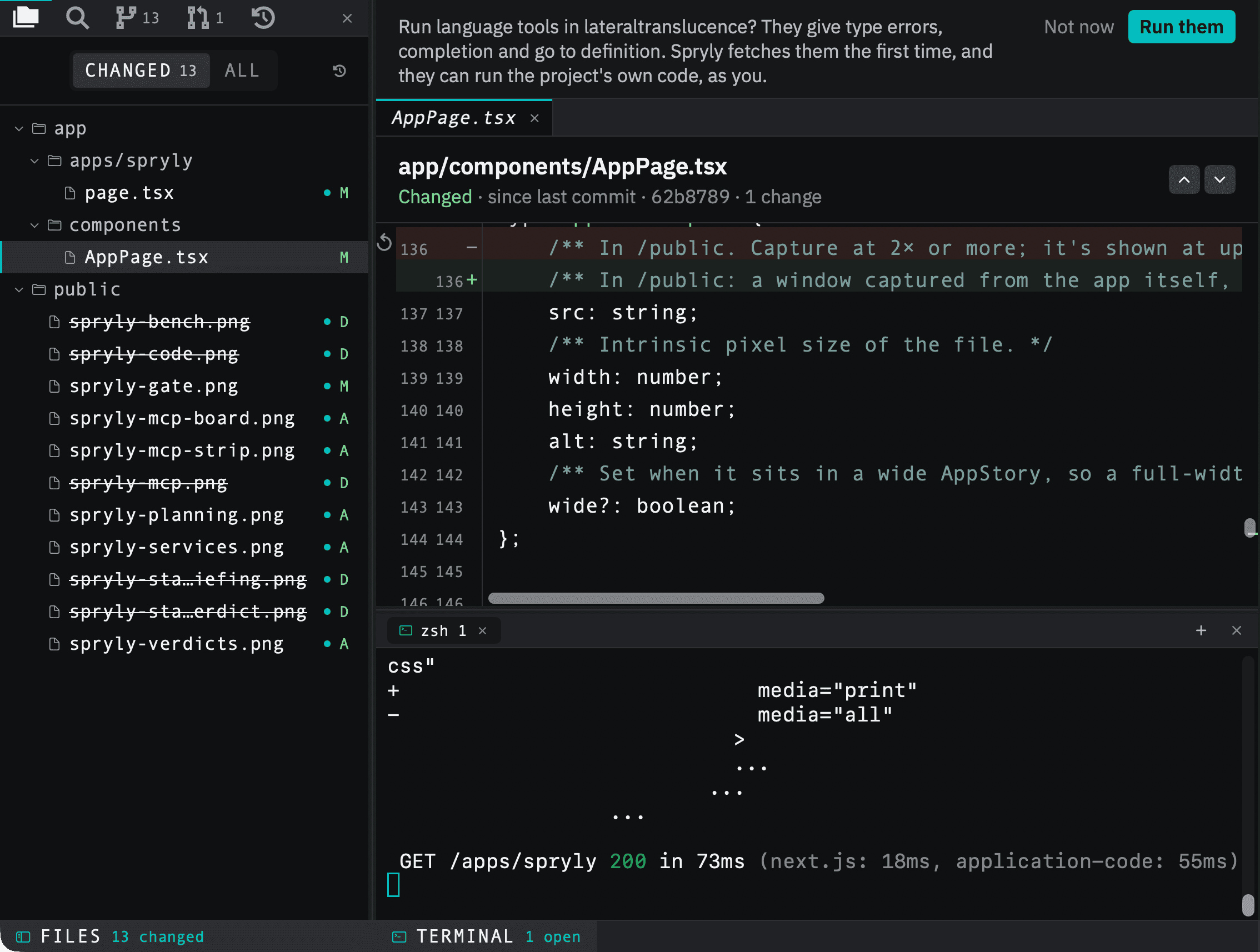
Spryly's Code section on this case study's branch while an agent works on it: the files it changed so far, an editable diff of AppPage.tsx with the change marked, and a terminal

AI access over MCP, with an undo

Spryly hosts a loopback-only API and ships its own MCP bridge, so Claude can do on the bench what you do: read the week, add and move tasks, plan days, log time, read a task’s attachments, and hand work to an agent. Every move goes through the same code as a drag or a tick, so a repeating task Claude finishes makes its next one.

Trust comes from being able to take things back. Whatever an agent changes is marked on the card and announced along the bottom of the window, with an undo that reverses the whole burst. Each tool carries MCP’s hints, so a client can ask before the heavier ones. The gate stays yours alone: agents can’t merge, push, or mark a file read.

The lateraltranslucence project's board with a task Claude Code just added over MCP, marked with the agent's glyph until it's looked at
The strip along the bottom of the window: “Claude Code added ‘Write the next app’s case study’ to lateraltranslucence”, with undo

Upgrade verdicts, not just version numbers

This is where Spryly started. Finding out a package is out of date is easy; knowing whether you can upgrade it is the hard part. The web service at spryly.io scans your GitHub and GitLab repositories, reads each lockfile, and gives every outdated npm, PyPI, and Composer package a verdict: ready, blocked, or worth a closer look.

Blocked packages quote the exact constraint and the order that clears it, and each project gets one command for everything that’s ready, checked together so the batch can’t conflict with itself. On the Mac, Stack shows the same data live over Supabase Realtime, and an upgrade goes to an agent like any other task, with the release notes and migration guides in its brief. Stack also watches the services each project runs on, from Cloudflare to Stripe, and flags the moment one degrades.

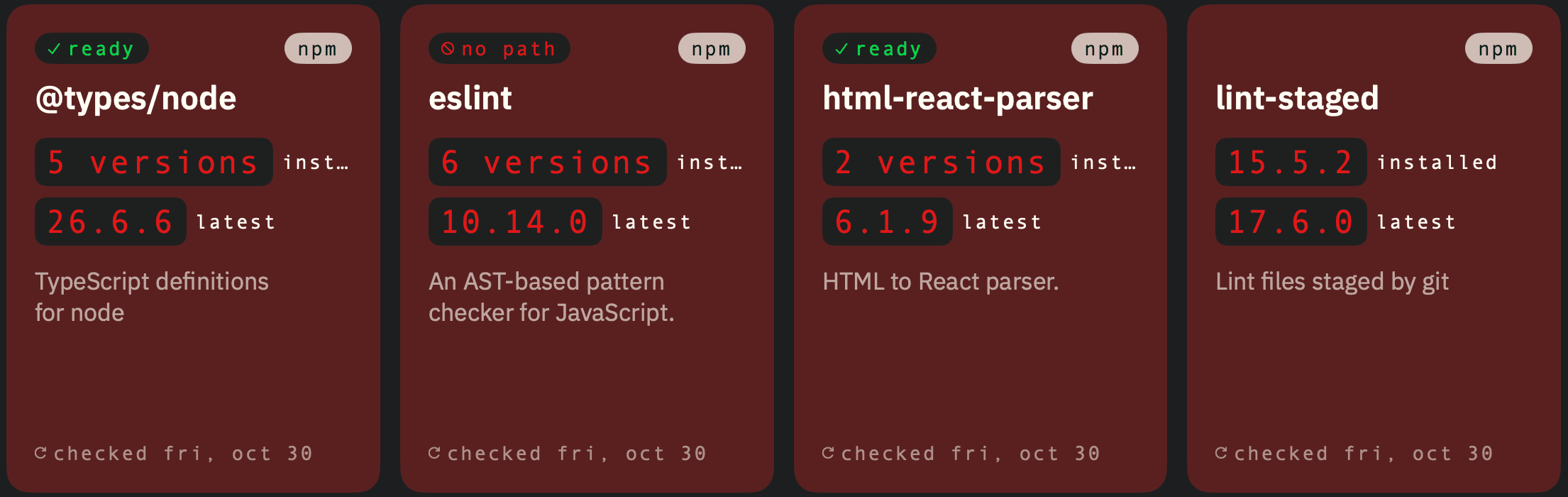
Package cards in Stack, each with a verdict: @types/node and html-react-parser ready, eslint with no path, and the installed and latest versions of each
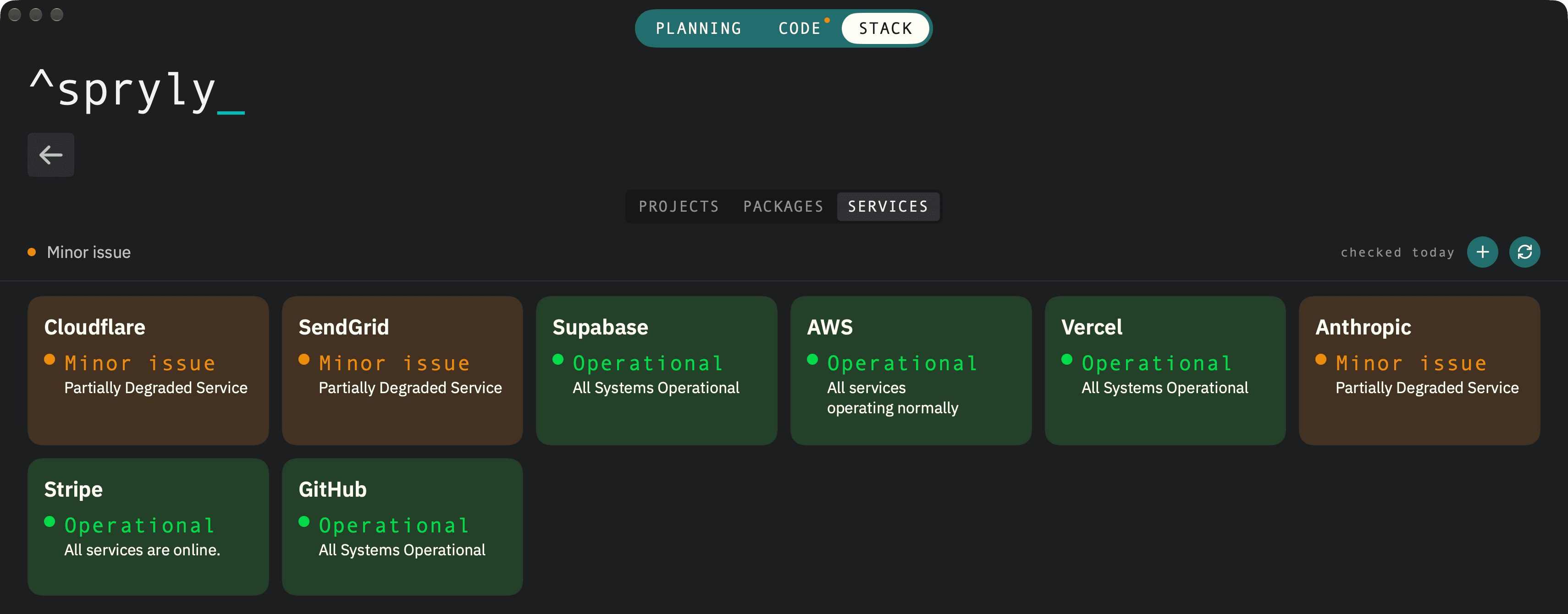
Stack's Services tab: Cloudflare, SendGrid, and Anthropic with minor issues; Supabase, AWS, Vercel, Stripe, and GitHub operational

Screenshots from Spryly for Mac, in its Graphite theme.

Under the Hood

Three surfaces on one account, each built to feel at home where it runs.

Spryly for Mac

Native Swift and SwiftUI, with AppKit where SwiftUI runs out. Code adds an editable diff, git, language servers, and the terminals agents run in. Signed with a Developer ID, notarized, and kept current by Sparkle.

  • Swift
  • SwiftUI
  • AppKit
  • SwiftTerm
  • Sparkle

Spryly for iPhone

The bench in your pocket, synced with every Mac. Read a pull request file by file and merge it under the same rules as the gate, with each read carried back to the desk.

  • Swift
  • SwiftUI

spryly.io

The dependency scanner, accounts, and billing. A Next.js app on Supabase, with Stripe for subscriptions and Upstash for rate limiting. The Mac app reads it through database views, never a copy.

  • Next.js
  • React
  • TypeScript
  • Supabase
  • Stripe
  • Upstash
  • SASS

See It Live

spryly.io has the rest of the story: what Spryly costs, how to get it, and the web dashboard to try today.

Have an app of your own in mind? LateralTranslucence designs and builds them, from the first sketch to the signed release.